
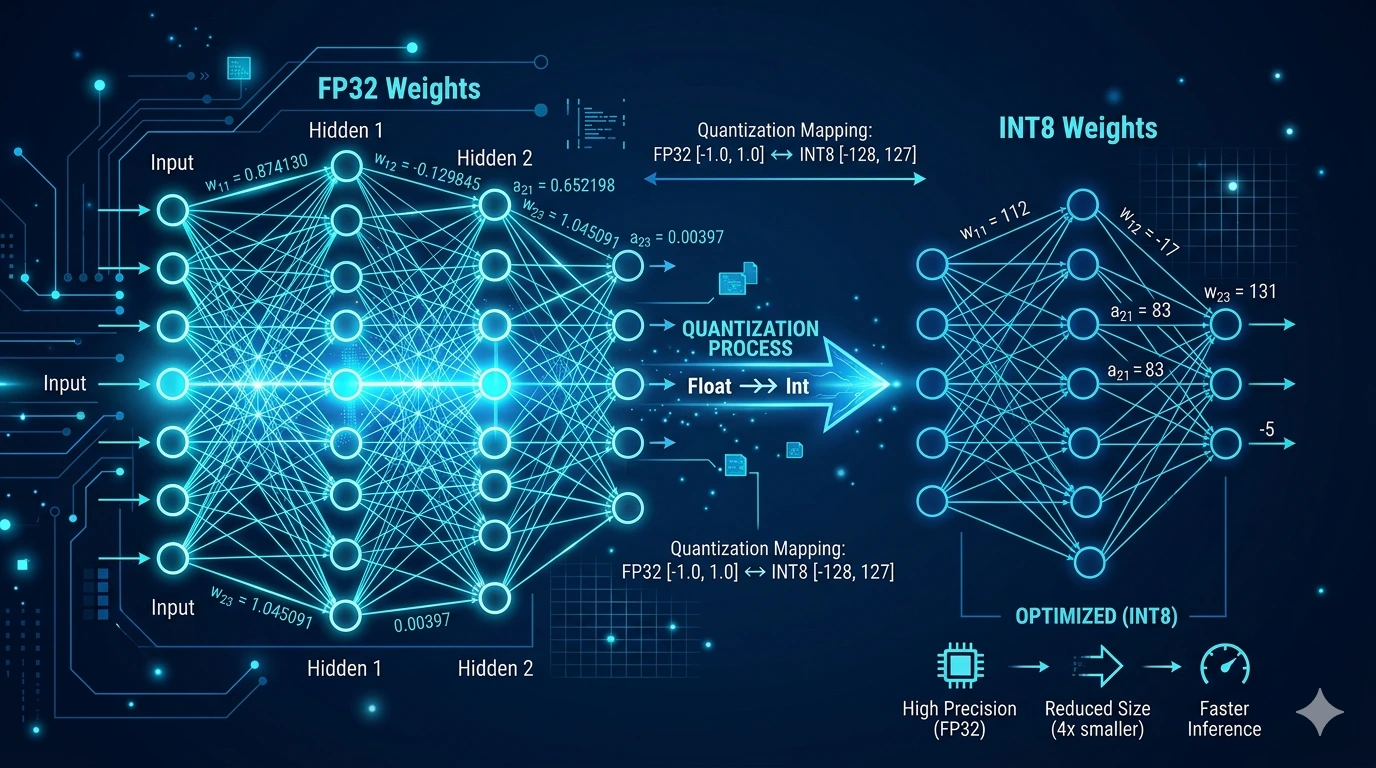
What is a quantized model?
If you have ever seen AI models before installation, you have probably come across something like: “mistral-7b-instruct-v0.3.Q4_K_M.gguf”. The model name may ring a bell, we have already explained the meaning of the letter “b”, but what is that string of letters and numbers at the end?…
That is quantization. A simple but clever technique that allows a powerful AI model to run on an ordinary office computer, without any significant loss in quality.
The key idea in one sentence
AI models originally require a huge amount of memory. Quantization reduces that memory footprint by storing the model’s internal “weights” (its numerical values) using fewer bits; slightly less precise, but with acceptable quality loss.
Think of it like compressing a photo: you go from a 48-megapixel original to a 12-megapixel version. When printed, the difference is barely visible, but the file is four times smaller.
Why is this necessary?
A 7-billion-parameter model in its original form requires around 28 GB of memory. A standard office computer simply cannot run it. With Q4 quantization, that same model fits into ~4.5 GB and can run comfortably on a machine with only 8 GB of RAM.
That is why ArkeoAI uses Q4_K_M or Q5_K_M models by default: quality is sufficient for everyday professional tasks, and the hardware requirements remain realistic.
The formats and what they mean
The most common quantization levels, from best quality to most compressed:
| Format | Size | Quality | RAM needed | Note |
| Q8_0 | ~7-8 GB | Excellent | 12+ GB | Near-perfect quality |
| Q5_K_M | ~5 GB | Very good | 8 GB | Recommended ✓ |
| Q4_K_M | ~4.5 GB | Good | 8 GB | Most widely used ✓ |
| Q3_K_M | ~3.5 GB | Fair | 6 GB | Last resort only |
| Q2_K | ~2.7 GB | Poor | 4 GB | Not recommended |
What does quantized data actually look like?
This is a legitimate question that rarely gets a straight answer. Here is a concrete example: imagine that one of the model’s internal values (a “weight”) originally holds this decimal number:
0.48291763
Quantization “simplifies” that value progressively and more aggressively depending on the compression level:
| Format | Stored value | What it means |
| Original (FP32) | 0.48291763 | Full-precision decimal number |
| FP16 (16-bit) | 0.4829 | Slight rounding, barely noticeable |
| Q8 (8-bit) | 123 | Integer on a scale (e.g. 0-255) |
| Q4 (4-bit) | 7 | Integer on a scale (e.g. 0-15) |
| Q2 (2-bit) | 2 | Only 4 possible values (0-3) |
Important: these values mean nothing in isolation. An AI model is made up of billions of such numbers that together form the model’s “knowledge”. A single number pulled out of context is meaningless, like a single letter taken from a book.
Can sensitive content be recovered from these values?
This is the question every privacy-conscious user asks and it is particularly important in the context of ArkeoAI.
The short answer: no.
The values stored in the quantized model (such as the 0.48… → 7 above) come from the model’s training process, not from your documents. Your files never enter the model; the model generalizes from texts seen during training, it does not copy them.
Your documents are stored in ArkeoAI in a separate database (the RAG system), which the model queries but never writes to. This database stays on the machine, offline, under your control.
In other words: the quantized model file (.gguf) contains nothing about your clients, your contracts, or your correspondence. That data stays on the computer, the model is simply a “tool” that gets queried.
Summary
Quantization is simply a compression technique: the AI’s internal values are stored with reduced precision so the model can run on more modest hardware. Quality loss is minimal for typical office tasks.
- Q4_K_M and Q5_K_M: the best balance between quality and hardware requirements
- A 7B model in Q4 weighs ~4.5 GB, compared to ~28 GB in its original form
- Your documents do not enter the model and cannot be extracted from it
- ArkeoAI runs offline: your data never leaves the machine